Smart Manikin Troubleshooting & FAQ
Select your course, session, and training stage below to see the tips that apply to you. Login help is shown for everyone.
Login Page (CPR & BLS)
I can't find my login code email.
Search your email inbox for "ALLCPR Smart Manikin LMS" or "access code".
I can't find a second AED, gauze, or other equipment mentioned in the first video.
Please follow the equipment list posted on the wall. We provide one AED trainer for both Adult and Infant scenarios. Please use tissue to simulate gauze. If any other required equipment (not marked as Optional on the wall) is missing, please contact support@allcpr.org or call the support number for assistance.
I'm having Bluetooth connection issues.
Please try the following:
- Make sure the manikin is plugged in and powered on.
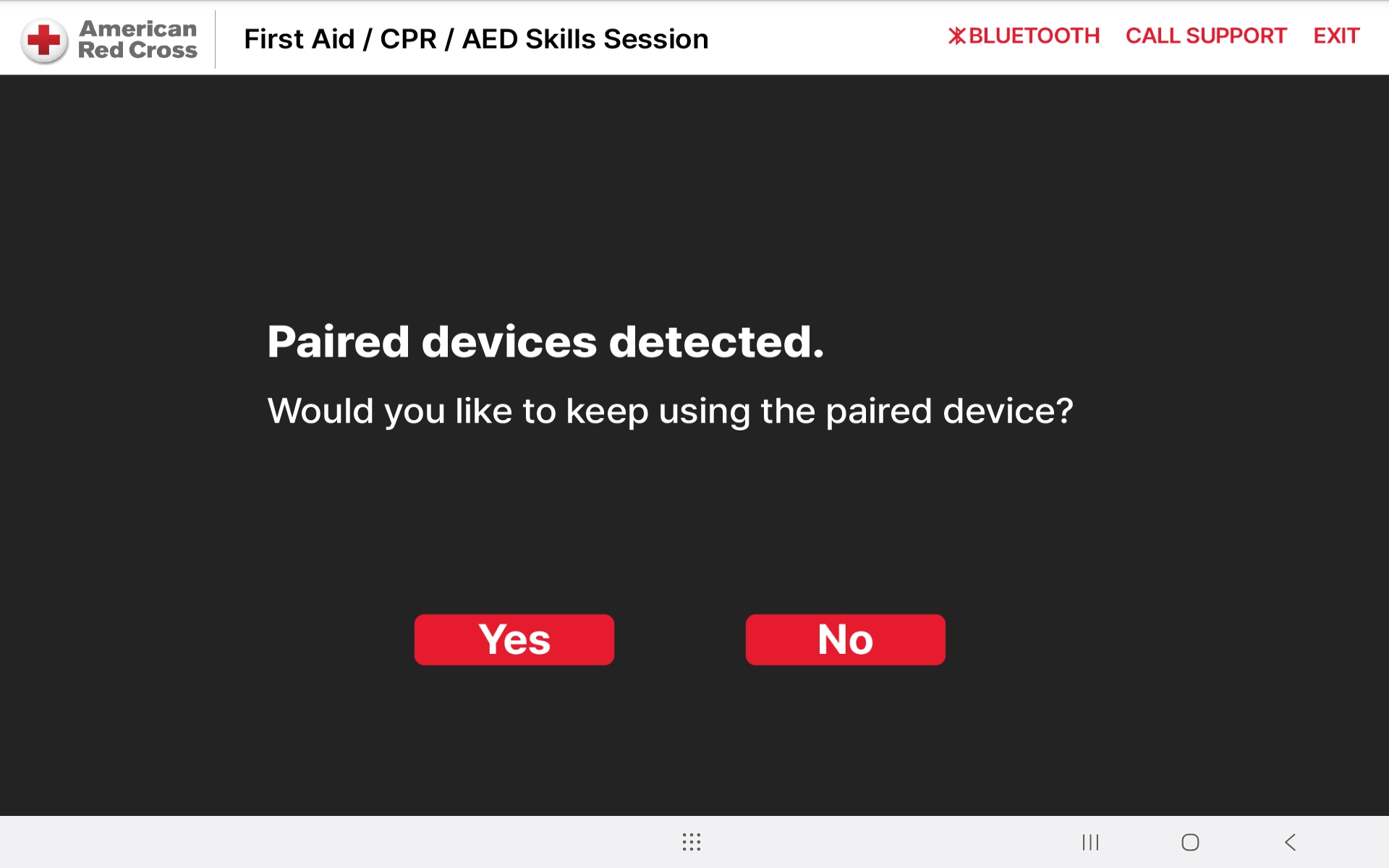
- If prompted on the Bluetooth connection page, select "Yes" to reconnect to the previously paired manikin. If you already chose "No", press the Exit button in the upper-right corner, which will redirect you back to the browser. Restart the "Launch Application" again.
Follow up Question: After selecting "Yes," the system stays on "Bluetooth Connecting" for more than 1 minute. What should I do?
Please reset the device:
- Exit the current training session.
- Unplug and reconnect the manikin.
- Restart the Smart Manikin and wait until the blue light turns on.
- Return to the Bluetooth connection page and select "No" to search for a new device.
-
Select the device with the serial number matching your manikin.
If no Bluetooth devices appear after selecting "No", unplug and reconnect the
manikin's power, wait for the blue light, then search again.
- Adult manikin: Serial number is located on the bottom of the manikin.
- Infant manikin: Serial number is located under the right arm (right armpit).


The manikin lost power during training and I lost all my progress. What should I do?
Please try the following:
- Reconnect the power.
- Exit the training, go back to the login page or browser, and relaunch the application.
- If your progress still cannot be restored, please contact support.
Compressing (CPR / BLS)
The tablet does not react when I give compressions. Why is that?
Make sure you choose "Yes" on the Bluetooth connection page.
If you already chose "No", press the Exit button
in the upper-right corner, which will redirect you back to the browser.
Restart the "Launch Application" again.
The app says "Place hands on center of the chest." What should I do?
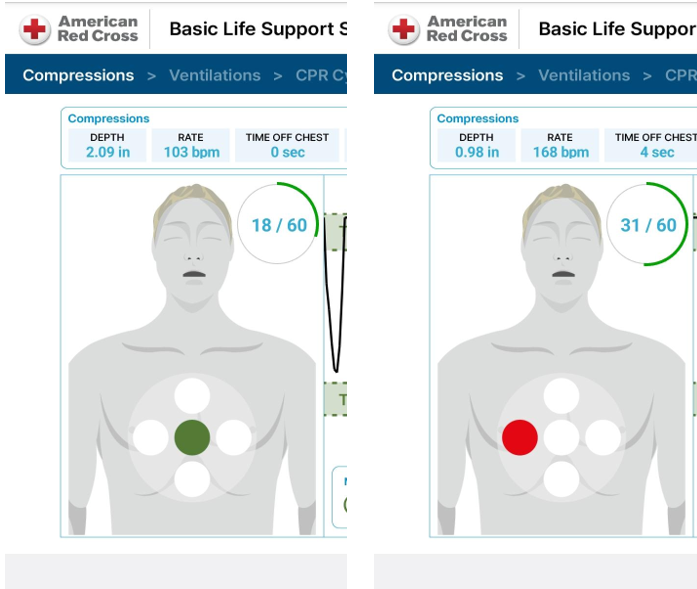
The manikin diagram on the left side of the screen shows the correct hand placement.
Green indicates correct hand placement. If you are pressing in the wrong location,
the area will be highlighted in red. Adjust your hand position accordingly.
I keep failing the compression step. What am I doing wrong?
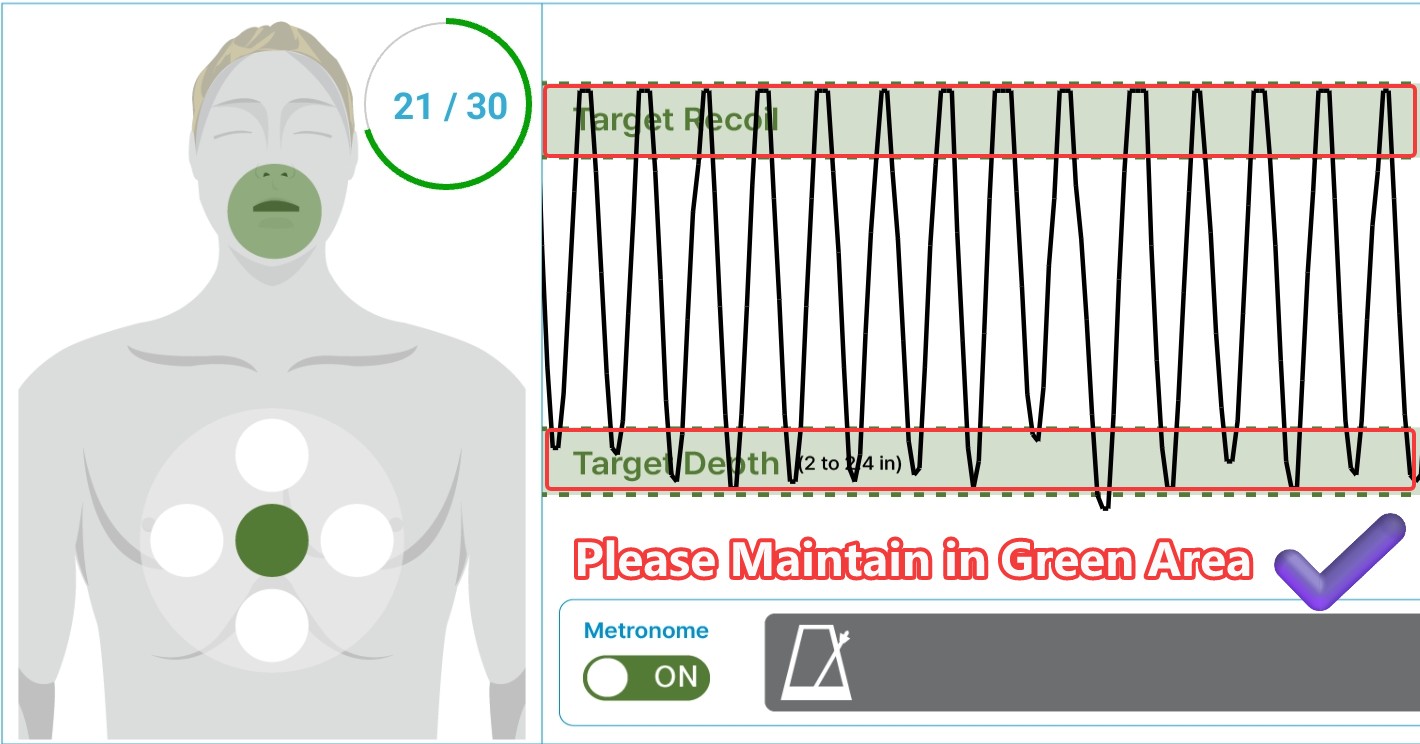
Watch the live line on the screen — your goal is to keep it inside the green zone. Two things matter:
- Full recoil: after each compression, allow the manikin's chest to bounce back completely before pressing again.
- Right depth: pressing too lightly or too hard will both fail. Adjust your force until the line stays within the green zone.

I failed "Compressed to at least 2 inches / 1.5 inches deep," although I think I'm compressing deep enough.
You may actually be pressing too deep. The wording of this result can be misleading. Watch the live compression line on the screen. The key is to keep the line within the green zone. Do not let it go even slightly beyond the green zone, as pressing too deep can also result in a FAIL. Adjust your compression depth until the line stays within the green zone.
(Infant) The top of my line never reaches the upper green zone.
This usually means the chest isn't fully released between compressions. Fully release the chest after every compression so the line returns all the way to the top before you press again.
Breathing / Ventilations (CPR / BLS)
The manikin is not detecting my rescue breaths. What should I do?
Please try the following:
- Lift the chin to open the airway before giving breaths.
- Ensure the mask forms a complete seal around the manikin's face. Make sure the narrow end of the pocket mask is positioned over the nose.
- If needed, try a different ventilation device (e.g., pocket mask, BVM, or face shield).
- Check the airway tube. In rare cases, the airway tube inside the neck may become disconnected. Lift the chin, look inside the neck, and reconnect the tube if it's off.
The app says "Less Air" even though I think I'm breathing correctly.
Focus on the line on the screen rather than the audio instruction — as long as the line lands inside the green zone, your ventilation is correct.

I gave two breaths, but the system only counted one.
This happens when the second breath starts before the first one has finished. Wait until the line from your first breath drops all the way to the bottom, then give the second breath.


CPR Cycle (CPR / BLS)
After the 2 breaths, the screen stays on the breathing page and doesn't move on.
The training seems stuck after I give two rescue breaths. What should I do?
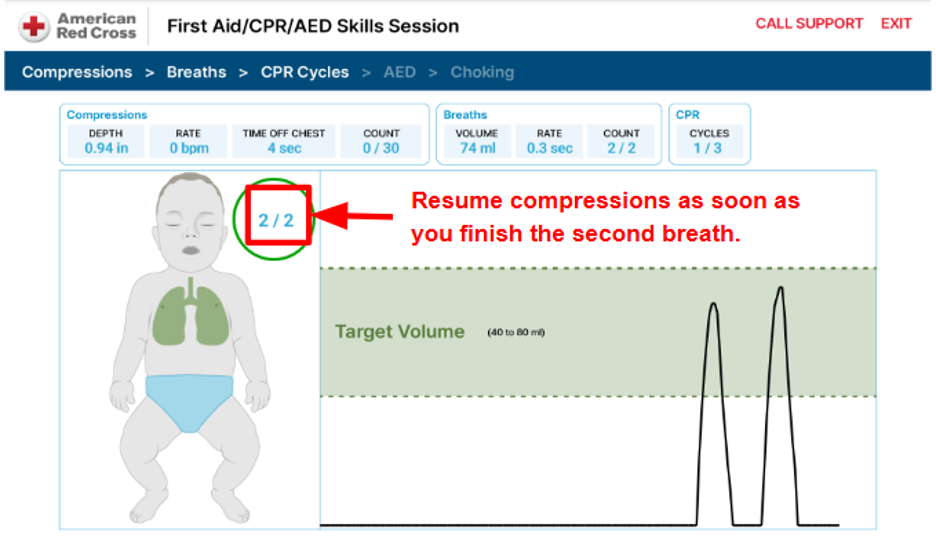
After the second rescue breath, immediately begin the next set of 30 chest compressions. The system does not provide an additional prompt before compressions, so do not wait or continue giving breaths.
I'm having trouble with the ventilation step inside the CPR Cycle.
The same tips apply as in the regular Breathing stage — see the Breathing / Ventilations section above.
I failed "Compressed without pausing for 10 seconds."
The CPR Cycle is a continuous loop of
30 compressions + 2 breaths with no pause in between.
The interruption between 30 chest compressions and the
next 30 chest compressions must be less than 10 seconds.
This includes the time needed to deliver 2 rescue breaths.
Complete both rescue breaths within this time and
immediately resume chest compressions after the second breath.
To minimize delays, place the breathing mask on the manikin before starting CPR.
The manikin is giving confusing or incorrect instructions.
Please reset the device:
- Exit the current training session.
- Restart the Smart Manikin and wait for the blue light to turn on.
- Reconnect Bluetooth and confirm the light turns green (green = Bluetooth connected), then continue.
AED (CPR / BLS)
The AED pads have nothing to plug into, or they look damaged.
That's okay — the pads don't need to connect to anything. The cable is a training prop only. Even if a pad looks worn, the app will detect it as long as it's placed in the correct position. If detection fails, double-check your pad placement — especially the pad on the lower right side of the torso.

Nothing is happening in the AED step. What do I do?
This section requires you to tap the screen. Tap the power button shown on the screen to turn on the AED, as illustrated below. The pad icons on the screen should turn green when placed correctly.

The AED won't deliver a shock.
Tap the Shock button on the screen. As long as the pads are placed correctly, you can continue — remember, the cable is simulated and doesn't connect to any machine.

Choking (CPR / BLS)
How do I start the choking practice?
Tap the pad to select the position where you'll perform the maneuver, then begin practicing.
Bleeding (CPR course only)
What am I supposed to do in the bleeding control step?
Press and hold the red zone for 60 seconds.

No items match the current filters.